
Android app
Your reference lap, corner by corner
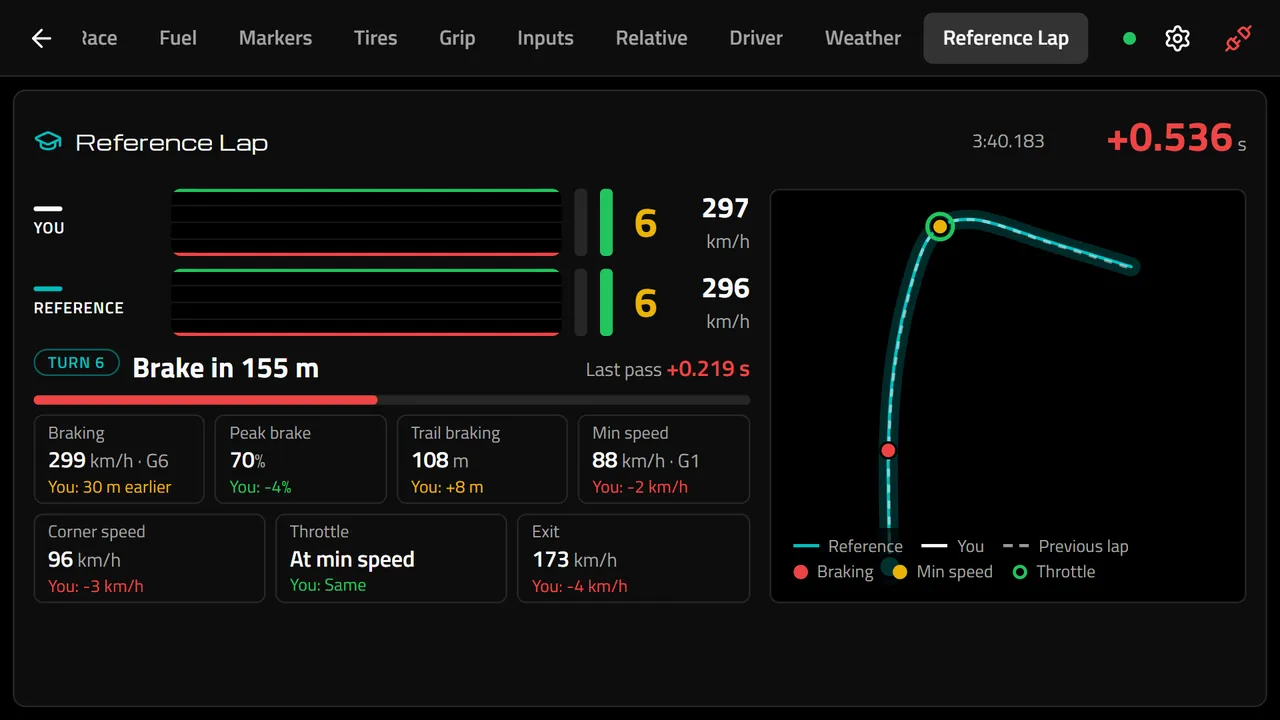
Endurance Manager runs on your phone, right next to your wheel. The Reference Lap compares your live telemetry with a faster lap and tells you exactly what to do in the next corner.
Sign up freeFree to start. Some parts need PRO.
What it shows in every corner
- Braking point, brake pressure, trail braking, minimum speed and exit speed against the reference lap.
- The reference racing line and yours, live, with how many metres apart you are.
- Position, fuel and laps to pit.
- Multiclass relative, live pedals and traffic alerts: who is behind, how far and whether they are faster.
Which lap is the reference
A coach's lap, your team's best lap or your own best lap of the session, on the same track and car class.
iRacing in full screen, no performance loss
Overlays are drawn on top of the game, so they need iRacing in windowed or borderless mode, which can cost your PC a lot of performance. With the app your telemetry lives on another device: iRacing stays in full screen and nothing is drawn over it.
It runs on any Android device: a tablet, an old phone or an emulator such as BlueStacks on a PC or laptop.
Frequently asked questions
- What do I need?
- The Endurance Manager desktop app on your iRacing PC and the Android app on a device next to your wheel.
- Is it free?
- The app is free with short videos. PRO makes it unlimited and removes the ads.
Plan your next endurance race
Free for one team of up to four drivers. Upgrade to PRO when you need more.
More features
- Stint PlannerPlan every stint of an iRacing endurance race: driver rotation, laps and fuel per stint, Push or Saving strategy, each driver's local time and an incident log that keeps the schedule right.
- Fuel CalculatorFree iRacing fuel calculator: total laps, total fuel, pit stops, laps and fuel per stint, and how much to save per lap to stretch one more lap. Supports Virtual Energy.
- Online Race RadarFollow your iRacing endurance race from any device: every car on the circuit map, gaps to the leader and between cars, and incident alerts, live for the whole team.
- Telemetry AnalysisCompare your iRacing laps on the web: speed, throttle, brake, gear, RPM and steering on the same chart, a time delta, and the corners ranked by where you can gain the most time.
- Race Calendar & Auto-AssignCollect driver availability before an iRacing endurance race, vote the best start time, create the event and let Endurance Manager distribute the stints fairly in one click.